Posts mit dem Label Tip werden angezeigt. Alle Posts anzeigen

Montag, 17. November 2008

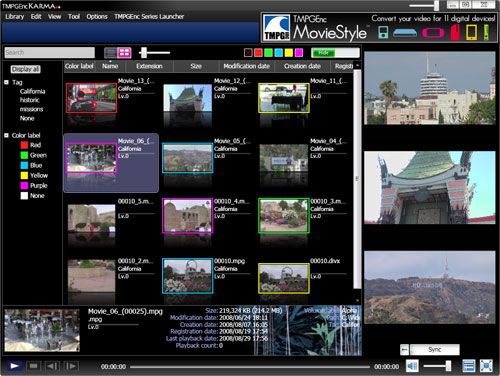
Neu: TMPGEnc Karma - Freeware Digital Video Organizer and Viewer

Looking for a better way to find and organize all of the videos on your computer? TMPGEnc KARMA.. lets you easily scan folders and add videos, creating a library listing of them on your computer. Organize your videos easily by using the sorting options, and even create your own custom description tags. View your videos in any of the multiple preview screens, and use the included TileShot CREATOR tool to create images from your videos! Add some good karma to your life and download TMPGEnc KARMA.. today! TMPGEnc KARMA.. can be used with videos playable in Window Media Player with the following video extensions:
.avi, .mpg, .mpeg, .wmv, .dvr-ms, .flv, .divx, .div, .m1v, .m2v, .mod, .mp2, .m2p, .mpa, .mpe, .mp4, .m2ts, .m2t, .mts, .mpv, .asf, .rm

http://tmpgenc.pegasys-inc.com/en/product/tmka.html


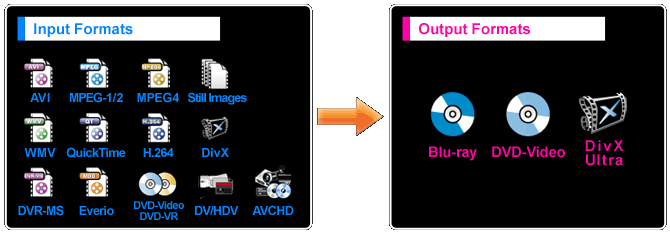
Neu: TMPGEnc Authoring Works (DVD, Blu-ray Disc, and DivX Ultra authoring software)


Your All-In-One Media Authoring Solution. Whether you’re young or old, beginner or professional, TMPGEnc Authoring Works 4 is the easy way to author your own DVDs, Blu-ray Discs, and DivX® ULTRA video. Import most video formats, edit out commercials or unwanted scenes, add spectacular transition effects, make your own subtitles, create professional-looking menus, and much, much more.

Full Featured.
And then some.

* Input MPEG-1/2, AVI, WMV, QuickTime, DivX, MPEG-4/H.264, AVCHD, DV/HDV, DVD-VR, DVR-MS video files and author to DVD-Video, Blu-ray (BDMV), and DivX Ultra formats.
* Camcorder AVCHD/HDV/DV video input support.
* Creates high quality DivX video.
* Edit out unwanted scenes or commercials.
* Create interactive menus from templates or make your own custom menus.
* Add or edit subtitles.
* Make your own slideshow DVDs and Blu-ray Discs in standard or high definition.
* Apply audio filters such as gap correction, noise reduction, and fade-in/out.
* 5.1 Dolby Digital Surround sound input/output.

See what else you can do.


Donnerstag, 13. November 2008

Beiträge der ZDF-Mediathek auf den PC speichern

> gibt es eine Möglichkeit, einen Beitrag der ZDF-Mediathek auf den PC zu
> aufzunehmen und zu speichern?
> Wer weiß bescheid?


1. "Windows Media Player" und "DSL 2000" einstellen
2. Gewünschte Sendung suchen und Video starten
3. Rechte Maustaste - Eigenschaften enthüllt die URL des soeben
gespielten Videos (Im Quellcode finde ich sie nicht ), endet auf .asx
4. Das ASX-File per http runterladen.
5. Das ASX-File in einen normalen Texteditor nehmen, es hat das Format
6. Die mms:// URL gibst Du einem Tool zu fressen, das damit umgehen
kann. Es gibt dafür diverse freie Anwendungen, ich benutze "mmsclient"
unter Linux. Es gibt auch "gmms" für Windows.

7. Die resultierende wmv-Datei kann z.B. vom TMPGEnc in SVCD
umgerechnet werden.

Die vom ZDF angeboteten Streams haben volle TV-Auflösung, die Auwahl
der besten Datenrate für Archivierungszwecke versteht sich von selbst.
Von der Archivierung von RealMedia-Files würde ich abraten, da es dafür
keine (freien) Konverter in andere Formate gibt.

.............

VLC kann das auch. Den Stream dann in eine Dateispeichern. VLC kann beim
Speichern gleich in *.mpg kodieren.

http://www.meinews.net/aufnehmen-t65200.html?s=8b2a27b1cc642f4e067759ff4d7c61cb&

Montag, 11. August 2008

Tip: Video Disk Recorder (VDR) von Klaus Schmidinger

Wiki Nachschlagewerk zum Video Disk Recorder (VDR) von Klaus Schmidinger
http://www.vdr-wiki.de/wiki/index.php/Hauptseite (vgl. VDR bzw. VDR Portal).

Homepage_
http://www.cadsoft.de/vdr/index.htm

With the availability of high capacity hard disks and MPEG encoders/decoders the idea of a fully digital video recorder comes to mind.

Meanwhile there are several commercial products on the market that implement this functionality. Some of these systems are mainly targeted at working together with special services provided by the system manufacturer, which offer the consumer a personalized recording strategy - and sometimes are available only at extra costs.

The downside of these systems is often the lack of a really flexible "timer recording" facility, and the manufacturers' tendencies to implement new ways of imposing advertisements on the viewer (since it would become too easy to skip the commercial breaks). They also don't support what one would expect to come natural with digital recording: on-disk editing. And finally they won't let you get access to the actual recorded digital data (for instance for archiving).

This project describes how to build your own digital satellite receiver and Video Disk Recorder. It is based mainly on the "Siemens/Technotrend" DVB-S digital satellite receiver card, and the driver software developed by the LinuxTV project. You can get such cards at www.dvbshop.net.


Sonntag, 8. Juni 2008

Selbstgebrannte CDs und DVDs: Wie Sie Ihre Daten retten

So beliebt selbstgebrannte Silberlinge sind, so empfindlich sind sie auch. Sonne, Hitze und Kälte können zu Datenverlusten führen. Rohlinge von minderer Qualität sind oft gleich nach dem Brennvorgang defekt. Im Notfall helfen Datenrettungsprogramme, den Schaden zu begrenzen."

Selbstgebrannte CDs und DVDs: Wie Sie Ihre Daten retten - Netzwelt - SPIEGEL ONLINE - Nachrichten:

Mittwoch, 4. Juni 2008

Web-Radio-Rekorder: WDR lässt Hörer Rundfunkprogramm mitschneiden

"WDR lässt Hörer Rundfunkprogramm mitschneiden

Wie damals mit dem Kassettenrekorder: Der WDR hat eben einen Dienst vorgestellt, der den Hörern das Aufzeichnen von Sendungen oder auch einzelnen Songs erlaubt. Man will die Kultur des Mitschneidens wiederaufleben lassen."

**allerdings nur komplette Sendungen!**

Welche Sender können mit dem WDR RadioRecorder aufgezeichnet werden?

1LIVE, WDR 2, WDR 3, WDR 4, WDR 5 und Funkhaus Europa.

http://www.spiegel.de/netzwelt/web/0,1518,557493,00.html

WDR-Radiohomepage

WDR-Radiorecorder

siehe auch Original-Softwarehersteller Tobit: ClipInc.vier!

Montag, 2. Juni 2008

TMPGEnc MovieStyle

Your movies. Your digital lifestyle.

MovieStyle gives you the freedom to convert your video clips for your portable and HD digital devices without the hassle of complex video tools or multiple applications.

Simply drag and drop your video files to easily convert them for 11 popular digital devices. Included tools and features help you organize, enhance, and transfer your video with just a few clicks!

http://tmpgenc.pegasys-inc.com/en/product/tms.html

Features At-A-Glance:
  • Easy to use for beginners
  • Converts most video file formats
  • Support for 11 different portable and HD devices!
  • Use the pre-made converting templates or use custom settings!
  • Drag 'n Drop converting
  • Quick Encode feature allows you to convert your movies without opening the application!
  • Audio-only output option
  • Karaoke Mode and Key Changer settings
  • Creates high-quality DivX® video
  • TransManager helps you easily transfer and organize your videos
  • Folder Monitoring option
8.) Cinema Mode

Cinema Mode converts your video to play at 24p (24 frames per second, progressive scan), which results in smoother, film-like playback.

Why is this? Some videos were origianlly created to play at 24p, but since the NTSC television broadcast standard is 29.97fps (interlaced), additional frames may have been inserted to make the video broadcast compliant. Using Cinema Mode will restore the video to its original framerate of 24p and deinterlaces the frames.

10.) Karaoke Mode

Like Karaoke? Or maybe you want to redub a video? With Karaoke Mode enabled, the vocals from your video are cancelled out, leaving you a clean slate to provide your own vocals.


MPEG Validator

MPEG Validator
MPEG-2 Program Stream Analyzer. Give us all info about MPEG-2 Program Stream Itself and detailed info about MPEG-2 video. It also contain a bitrate viewer and a gop structure viewer.

This version of MPEG Validator only support MPEG-2 PS legacy media

http://www.geocities.com/gabrielgoc/

Freeware

Anleitung: Create AVCHD discs with subtitles using tsMuxeR

Anleitung: Create AVCHD discs with subtitles using tsMuxeR

The new tsMuxeR version 1.84 introduces support for .SRT subtitle format. In our previous guides we have shown you how to author Blu-ray/AVCHD discs from .MKV files using tsMuxeR. This guide is an extension to our previous guide, covering the new subtitle features of the tsMuxeR. By using this guide you can convert compliant high definition .MKV (Matroska) source files to the AVCHD format, with subtitles but without the lengthy process of re-encoding the file.

http://www.bitburners.com/articles/create-avchd-discs-with-subtitles-using-tsmuxer/4047/

Advanced Video Codec High Definition (kurz AVCHD, englisch für Fortgeschrittener Video Codec hoher Auflösung) ist ein digitales Aufzeichnungsformat für Camcorder mit Aufzeichnung auf digitale Datenträger, wie zum Beispiel DVDs, SD-Karten, Memory Sticks, Festplatten oder Festspeicher. Es verwendet den H.264/MPEG-4 AVC-Codec und steht in direkter Konkurrenz zu den Formaten MiniDV und besonders HDV, welches das ältere MPEG-2 verwendet.

Montag, 28. April 2008

MediaCoder - more than a universal audio/video transcoder

Tip: MediaCoder is a free universal batch media transcoder, which nicely integrates most popular audio/video codecs and tools into an all-in-one solution. With a flexible and extendable architecture, new codecs and tools are added in constantly as well as supports for new devices. MediaCoder intends to be the swiss army knife for media transcoding in all time and at this moment, it already has millions of users from 170+ countries all over the planet.

Homepage: http://mediacoder.sourceforge.net/index.htm

dt. Anleitung

MediaCoder for devices

Features In Brief

  • Convert to and from many audio and video compression formats and re-multiplex into various container formats in batches
  • Full control over transcoding parameters, you can learn about audio/video encoding and play with various codecs
  • Strong decoding capability for partial or corrupted contents
  • Simplified UI for popular mobile devices (e.g. PSP, iPhone/iPod)
  • Fully standalone, no dependance on system codecs/splitters
  • Extension (scripting language) infrastructure to expand user interfaces and improve user experience

Typical Applications

  • Improving compression / reducing size for audio/video files
  • Converting for audio/video playback devices (digital audio player, MP4 player, mobile phone, PDA, PSP, VCD/DVD player etc.)
  • Extracting audio tracks from video files
  • Ripping audio/video discs
  • Reparing corrupted or partial downloaded video files

Supported Fomats

* supported as input only


HandBrake: DVD-Konverter der Sonderklasse

Tip: Open-Source-Konverter (DVD/MPEG2)

Anleitung:
HandBrake: DVD-Konverter der Sonderklasse
Homepage:
http://handbrake.fr/

Details

HandBrake is an open-source, GPL-licensed, multiplatform, multithreaded DVD to MPEG-4 converter, available for MacOS X, Linux and Windows.

Screenshots of 0.9.1: Click Here

Supported sources:

  • Any DVD-like source: VIDEO_TS folder, DVD image or real DVD (encrypted or unencrypted, but protection methods other than CSS are not supported and must be handled externally with third-party software), and some .VOB and .TS files
  • PAL or NTSC
  • AC-3, DTS, LPCM or MPEG audio tracks

Outputs:

  • File format: MP4, MKV, AVI or OGM
  • Video: MPEG-4 or H.264 (1 or 2 passes or constant quantizer/rate encoding)
  • Audio: AAC, MP3, Vorbis or AC-3 pass-through (supports encoding of several audio tracks)

Misc features:

  • Chapter selection
  • Basic subtitle support (burned into the picture)
  • Integrated bitrate calculator
  • Picture deinterlacing, cropping and scaling
  • Grayscale encoding

Donnerstag, 17. April 2008

Convert .MKV files to Blu-ray or AVCHD

This time we show you how to convert .MKV (Matroska) files into Blu-ray or AVCHD format. The AVCHD is a fairly new format introduced by Sony and Panasonic mainly for video camera recording, but the PlayStation 3 has native support for this format. Most likely some Blu-ray players also support, or will support the AVCHD format. Generally the AVCHD is nothing new - it is basically a Blu-ray file structure and content recorded on a regular DVD media. The media capacity is lower than with Blu-ray, so the quality is not as good but still AVCHD can store high definition 720p movies on a single DVD-R.

Link
http://www.bitburners.com/articles/convert-mkv-files-to-blu-ray-or-avchd-for-playstation-3-using-tsmuxer/4019/

The High Definition DVD FAQ

Sonntag, 13. April 2008

Tip: kamiwa’s Batch Encoder (KBE) für DivX

kamiwa’s Batch Encoder (KBE) für DivX und der zugehörige DivX-Blog - Freeware

KBE is a small tool I originally had written just for myself to help me optimize my DivX video encoding workflow. The video files I encode here are mainly DVB-S captures. So I needed to cut them, to get rid of unwanted commercials.

So the whole process normally involved:

  1. demuxing
  2. cutting
  3. creation of d2v project
  4. creation of AviSynth script
  5. adding job to VirtualDubMod and encoding the video
  6. encoding audio with BeSweet
  7. and finally muxing to DivX.
kamiwa’s Batch Encoder (KBE)
kamiwa's Blog
kamiwa's Must Haves
DivXMuxGUI Home
DivX Web Player SDK

Filmerit 2.1 (to manage the DirectShow filters, and solve the codec problems)

"Filmerit 2.1 (to manage the DirectShow filters, and solve the codec problems): 'Filmerit analysiert alle installierten DirectShow-Filter auf ihre Funktionstüchtigkeit und versucht sie gegebenenfalls zu reparieren. Hilft alles nichts, kann man die Filter mit Filmerit testweise deaktivieren, ganz entfernen oder verschiedene Filterkonfigurationen miteinander vergleichen.'"

Filmerit 2.1

Samstag, 12. April 2008

Liste der Videoportale für Deutschland und andere Länder

Videoportale im Internet erfreuen sich in den letzten Jahren auch in Deutschland immer größerer Beliebtheit. Kannte man früher eigentlich nur YouTube, hat sich die Lage inzwischen völlig gewandelt und auch in Deutschland sind nun entsprechende Angebote zu finden. Besonders TV-Sender haben die Chance erkannt ihre Inhalte auch online zu verbreiten.
die Liste der Videoportale

FreeTV-Liste
http://www.freeetv.com/

OnlineStar Gewinner 2007 -Videoportale
1. www.youtube.com
2. www.myvideo.de
3. www.clipfish.de
4. www.youtube.de
5. www.sevenload.de
6. www.maxdome.de
7. www.t-online.de
8. www.my-video.de
9. www.clipfisch.de
10. www.autsch.de

Montag, 7. April 2008

Update: Neues zu Recode 3.0.3>neu:3.1.2.0 (Bestandteil Nero 8.2.8.0>neu:8.3.2.1)

Update: Neues zu Recode 3.0.3>neu:3.1.2.0 (Bestandteil Nero 8.2.8.0>neu:8.3.2.1): Filter für Vorverarbeitung von Videos (Farbkorrektur, Rauschunterdrückung und benutzerdefinierte Filter), Unterstützung für Interlaced-Enkodierung und adaptive Framerate-Konvertierung, Neuer ASP-Enkodierer mit für Mehrkernprozessoren optimiertem Multithreading, Aktuellster AAC-Enkodierer, Vereinfachte Nero Digital™-Profile, Neue PlayStation® 3- und PlayStation Portable-Profile, Neues iPod®- und iPhone-Profil, Neu strukturierte Benutzeroberfläche, Optionale "Pass Through"-Benutzereinstellung für AC3-Audioquellen ohne Transkodierung, Verbesserte Importfunktionalität für Dateien, Unterstützung weiterer Formate (Flash Videoformat, HD DVD-Videos, Transportstream von DVB-Aufnahmen) Changelogs - Trialware


Achtung: Nero Recode 3.1.2.0 (Profil 'Standard' d.h. nicht 'AVC') nutzt als Audio-Zielformat statt AAC jetzt standardmäßig MP3 in seinem MP4-Container bzw. integriert eine vorhandene AC3-Mehrkanal-Audiospur unbehandelt d.h. also: die neuen MP4-Container lassen sich ohne Rekodierungen leichter nach AVI/DIVX/MKV-Container ummodeln! Für AVC/h264-Profiles bleibts wie bisher > AAC als Audiostandardausgabe!

Tip: Handbücher zu Nero 8

Tip: Handbücher zu Nero 8 z.B. Nero Recode3 (ab Seite 35-48 "DVDs und Videos zu Nero Digital rekodieren") -> Achtung Nero 8 "telefoniert" nachhause (z.b. bei Recode dank "C:\Programme\Gemeinsame Dateien\Nero\Shared\NL3\NeroPatentActivation.exe" stillegen per "umbennen" der entspr. Datei)


Tip: älter, aber weils gerade passt: Nero Digital auf dem 415 - Alle Einstellungen bzw. Nero Digital™ in Action bzw. Nero AAC Referenz Audio Codec für MPEG-4 und 3GPP Standards

Tip: Kiss DejaVu Enc

Tip: Kiss DejaVu Enc - Easily re-encode problem mpegs to DVD-complaint MPEGs or streams. Also works great as a batch encoder/ demuxer. New version (v2008) automatically creates a Cutterman project file (*.cfp) and a GUI for dvd author project file (*.gfd). Uses FFmpeg(encoder), Comskip(automatic commercial detection), DGIndex demux. Requires MS Framework 2.0. Freeware